Every step of a session as it happens, from whichever device is in your hand.
Chat
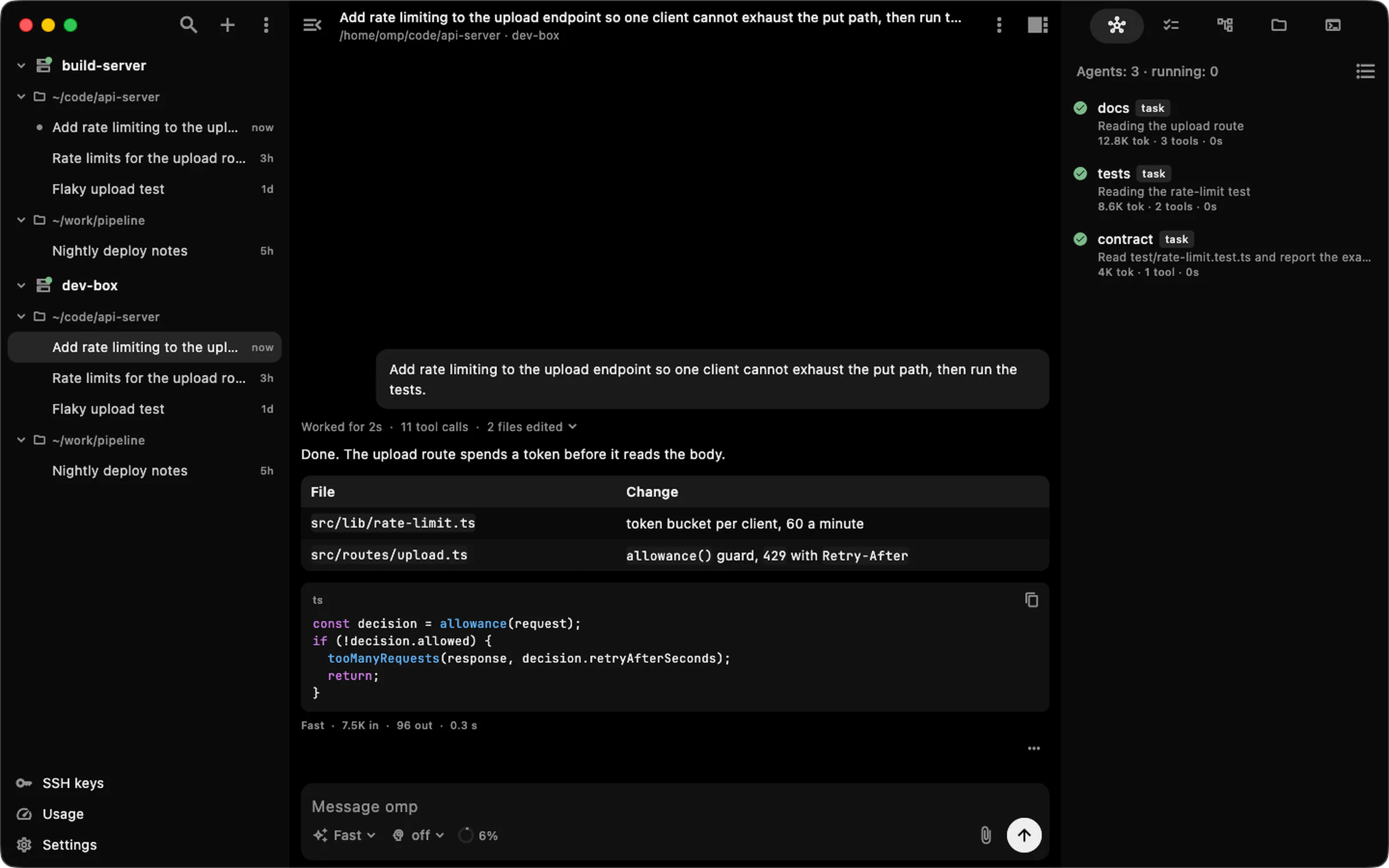
Watch the turn, then fold it away.
Replies stream in with every tool call. A quiet line counts the wait until the first word, and a
finished turn folds into one line: time, tool calls, files edited.
~/code/api-server · dev-boxDone
Add rate limiting to the upload endpoint so one client cannot exhaust the put path, then run the tests.
Worked for 19s · 11 tool calls · 2 files edited
Done. The upload route spends a token before it reads the body.
This computer on desktop, any SSH host, hosts behind a chain of jump hosts, and Tailscale peers.
Sessions
Lock the phone. The turn keeps going.
MachinePhoneLockedCaught up
Sessions run detached on the machine. A dropped connection or a closed app does not stop the turn; the
app reconnects and catches up.
Where it runs
The work happens on your machine.
The app talks SSH to your machine. omp runs there and calls the AI providers configured there, with
your own accounts. Nothing passes through a server of ours.
This deviceompanionSSHto
Jump hostsif you use themSSHto
Your machineomp runs hereAPIto
AI providersthe ones you set up
Privacy
No account. No daemon. No telemetry.
Stock omp on the machine, plus a small companion extension the app uploads. No sign-up, no analytics,
no crash reporting.
iPhone, iPad, Android and Windows install from their stores. The macOS and Linux files, and a Windows zip, are
on the latest GitHub release, or build from source.
'%20d='M268.2%20340.25%20C268.2%20308.63%20293.83%20283%20325.45%20283%20L698.55%20283%20C730.17%20283%20755.8%20308.63%20755.8%20340.25%20L755.8%20340.25%20C755.8%20371.87%20730.17%20397.5%20698.55%20397.5%20L325.45%20397.5%20C293.83%20397.5%20268.2%20371.87%20268.2%20340.25%20Z%20M342.4%20340.25%20C342.4%20308.63%20368.03%20283%20399.65%20283%20L399.65%20283%20C431.27%20283%20456.9%20308.63%20456.9%20340.25%20L456.9%20594.65%20C456.9%20626.27%20431.27%20651.9%20399.65%20651.9%20L399.65%20651.9%20C368.03%20651.9%20342.4%20626.27%20342.4%20594.65%20Z%20M567.1%20340.25%20C567.1%20308.63%20592.73%20283%20624.35%20283%20L624.35%20283%20C655.97%20283%20681.6%20308.63%20681.6%20340.25%20L681.6%20683.75%20C681.6%20715.37%20655.97%20741%20624.35%20741%20L624.35%20741%20C592.73%20741%20567.1%20715.37%20567.1%20683.75%20Z'/%3e%3c/svg%3e)